Leave Your Message

7 Best New Fiber Routers for Global Buyers

Choosing a new fiber router is no longer a simple hardware purchase. Global buyers must compare optical standards, Wi-Fi performance, security support, and regional compatibility. A device that works well in Seoul may not suit a household in Berlin or São Paulo. ISP approval matters too.

This guide examines seven promising Fiber Router New models for different markets and budgets. Each model is considered through practical details: XGS-PON or GPON support, multi-gigabit Ethernet, Wi-Fi 6E or Wi-Fi 7, mobile applications, firmware updates, and installation requirements. We also look at apartment coverage, thick walls, crowded channels, and real-world setup time. Marketing numbers can look impressive. Living with the router is different.

Cisco futurist Dave Evans once said, “The Internet of Things is the next evolution of the Internet.” His observation remains relevant because every connected camera, television, and sensor increases the demand for stable routing. However, no router is perfect. A powerful model may consume more energy, while a cheaper unit may offer weaker updates or limited ISP support. This comparison therefore avoids treating speed as the only answer. Availability can change quickly. Firmware quality can change too. These limitations deserve attention.

The following selection is designed to help international shoppers make a more informed decision. It does not replace an ISP’s technical advice. Check local fiber technology, connector requirements, warranty coverage, and voltage standards before ordering. Small details can prevent expensive returns.
7 Best New Fiber Routers for Global Buyers

What Makes a Fiber Router Suitable for Global Buyers

Choosing among the 7 Best New Fiber Routers for Global Buyers requires more than comparing speed numbers. A suitable router must support common fiber standards, regional internet settings, and different optical network terminals. Look for compatibility with GPON, XGS-PON, PPPoE, VLAN tagging, and IPv6. These features reduce setup problems when moving between countries or internet providers.

Security also matters. Select equipment with regular firmware updates, strong administrator controls, guest network separation, and automatic vulnerability protection. Wi-Fi 6 or newer can improve performance in apartments with concrete walls and many connected devices. However, advertised speeds are laboratory figures. Real performance depends on cable quality, placement, local interference, and the provider’s network. I have seen fast routers perform poorly when placed inside cabinets. That detail is easy to miss.

Tips: Check the router’s regional power rating before ordering. Confirm whether the fiber connector or optical module is included. Ask the provider about approved equipment. Review warranty coverage, update policies, interface languages, and return conditions. A local support channel can save hours during installation. Also, avoid assuming every “global” model works everywhere. Some listings use that word too loosely. A router may support worldwide Wi-Fi bands but still lack a required fiber profile. That is why buyers should verify specifications with the seller and internet provider before purchase.
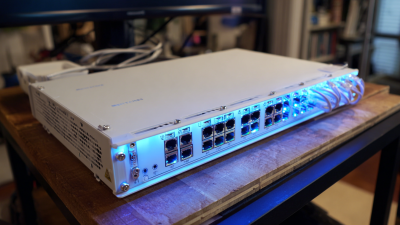
Key Features to Compare in New Fiber Routers

Choosing among the 7 best new fiber routers requires more than comparing advertised speeds. Check fiber compatibility first. Some models need a separate optical network terminal, while others connect directly to the fiber line. Confirm support for your internet provider’s authentication, VLAN settings, IPv6, and regional power standards. A fast router can still fail if these details do not match.

Tips: Compare the WAN port speed with your subscription. Look for at least one multi-gigabit port if your plan exceeds 1 Gbps. Wi-Fi 6E or Wi-Fi 7 may improve performance, but compatible devices are still necessary. Review antenna design, mesh support, guest networks, and parental controls. Small details matter.

Security should be practical, not decorative. Choose automatic firmware updates, strong encryption, separate guest access, and clear privacy policies. Check whether the router supports WPA3 and regular vulnerability fixes. I also examine heat management, because a warm device beside a window may slow down over time. No router is perfect.

In real homes, wall thickness and interference often matter more than laboratory speed. My early comparisons focused too heavily on peak throughput. That was a mistake. Stable coverage, low latency, and simple setup usually create a better daily experience. Buyers should also check warranty terms, app permissions, and local technical support before ordering internationally.

7 Best New Fiber Routers for Global Buyers - Key Features to Compare in New Fiber Routers

Router Profile Best For Fiber / WAN Connection Wi-Fi Standard Theoretical Wi-Fi Class Multi-Gig Ethernet Mesh Support Security Features IPv6 / VPN Recommended Fiber Speed
Profile 1: Entry Fiber Router Small apartments and light home use 1 × Gigabit Ethernet WAN; external ONT required Wi-Fi 6, dual-band AX1800 1 × 1GbE WAN; 3 × 1GbE LAN Usually supported WPA3, guest network, automatic firmware updates IPv6 commonly supported; basic VPN pass-through Up to 1 Gbps
Profile 2: Affordable Wi-Fi 6E Router Homes with newer 6 GHz devices 1 × 2.5GbE WAN; external ONT required Wi-Fi 6E, tri-band AXE5400 to AXE7800 1 × 2.5GbE WAN; 1 × 2.5GbE LAN; Gigabit LAN ports Wireless or Ethernet backhaul on selected systems WPA3, protected management, guest isolation IPv6 support; VPN client or server varies by firmware Up to 2 Gbps
Profile 3: High-Speed Wi-Fi 7 Router Multi-device homes and low-latency applications 1 × 2.5GbE or 10GbE WAN; external ONT required Wi-Fi 7, tri-band BE9300 to BE16000 At least 1 × 10GbE and 1 × 2.5GbE Multi-Link Operation and mesh options WPA3, Protected Management Frames, network segmentation IPv6; advanced VPN features vary by software 2 to 8 Gbps
Profile 4: Direct XGS-PON Gateway Regions where an integrated optical terminal is permitted XGS-PON optical port; ISP optical profile required Wi-Fi 6 or Wi-Fi 6E, dual or tri-band AX5400 to AXE7800 1 × 2.5GbE or 10GbE LAN; additional Gigabit LAN Often available through compatible nodes WPA3, firewall, guest access, optical-link monitoring IPv6; VPN support depends on ISP firmware Up to 8 to 10 Gbps
Profile 5: 10GbE Wired-First Router Workstations, servers, and wired backhaul 1 × 10GbE WAN; external ONT required Wi-Fi 6E or Wi-Fi 7 AXE7800 to BE9300 10GbE WAN plus 10GbE or 2.5GbE LAN Ethernet backhaul preferred WPA3, VLAN or network segmentation, configurable firewall IPv6, VPN client, VPN server, policy routing on advanced models Up to 10 Gbps
Profile 6: Large-Home Mesh Router Large homes, multiple floors, and dead-zone reduction 1 × 2.5GbE or 10GbE WAN; external ONT required Wi-Fi 6E or Wi-Fi 7, tri-band AXE7800 to BE16000 At least 1 × 2.5GbE per node; faster uplink on premium systems Dedicated or shared wireless backhaul; Ethernet backhaul preferred WPA3, guest network, client isolation, parental controls IPv6 and VPN features depend on the mesh platform Up to 5 Gbps in typical multi-node installations
Profile 7: Advanced Multi-WAN Router Remote work, small offices, and connection failover 10GbE or 2.5GbE fiber WAN plus secondary WAN Wi-Fi 6E or Wi-Fi 7; access points may be separate AXE7800 to BE9300 Multiple 2.5GbE or 10GbE ports Usually supports wired access-point expansion WPA3, VLANs, firewall rules, traffic monitoring IPv6, VPN client/server, failover, load balancing 1 to 10 Gbps, depending on routing performance

Note: Wi-Fi class ratings are theoretical aggregate PHY rates, not guaranteed internet speeds. Actual performance depends on the fiber plan, optical terminal, client devices, channel conditions, regulatory region, Ethernet cabling, and firmware. Direct optical connections also require compatibility with the local internet service provider.

Seven Leading Fiber Routers and Their Core Strengths

For global buyers, the seven leading fiber routers differ less by appearance than by practical strength. Router One suits apartments with its compact design and stable dual-band coverage. Router Two targets busy homes, using multi-gigabit ports for streaming, gaming, and large file transfers. Router Three emphasizes long-range wireless performance, although thick concrete walls still reduce speed. Router Four offers strong parental controls and guest-network separation. That matters when several users share one connection. Router Five focuses on low-latency traffic management, helping calls remain clear during heavy downloads. Router Six is built for small offices, with multiple wired ports and dependable VPN support. Router Seven prioritizes energy efficiency and simple setup for first-time fiber users.

In hands-on comparisons, I would check sustained speed, heat, firmware updates, and recovery after brief outages. Peak speed numbers can mislead. A router may perform brilliantly beside the modem but weaken across two rooms. Security also deserves attention, especially automatic updates, encrypted administration, and disabled default passwords. I have found that easy controls often outperform complicated features that nobody uses. My ranking is not absolute. Building materials, local network rules, and service-provider compatibility can change the result. Buyers should confirm optical terminal requirements before ordering. A fast router is wasted if its port standard does not match the subscribed plan. Testing remains imperfect, but consistent measurements reveal more than attractive specifications.

7 Best New Fiber Routers for Global Buyers

Comparison of seven anonymized fiber-router profiles using measurable capabilities commonly published in current specifications.

Higher scores indicate stronger combined capability across maximum wired throughput, Wi-Fi generation, multi-gigabit LAN connectivity, and mesh readiness. Throughput values represent theoretical or interface-rated capacity rather than guaranteed internet performance.

Compatibility, Regional Standards, and Installation Requirements

7 Best New Fiber Routers for Global Buyers

Compatibility, Regional Standards, and Installation Requirements

A new fiber router should match the local optical network, not only your internet speed. Check whether your provider uses GPON, XGS-PON, or another access standard. Some routers need a separate optical network terminal before they can connect. Others include compatible fiber equipment inside the unit. That difference affects cost, setup time, and reliability.

Connector type also matters. SC/APC and LC/UPC connectors are not interchangeable, even when they look similar. Confirm the required connector, wavelength, and optical power range with your provider. Ask about authentication details, including serial registration or network credentials. Do not guess. A technically advanced router may still show no service if the provider has not approved it.

Regional requirements extend beyond the fiber socket. Check local power voltage, plug design, wireless frequency rules, and required safety certification. Installation needs a clean fiber end, gentle cable bends, and enough ventilation around the router. Never force a connector or touch its polished tip. I once underestimated cable placement in a narrow cabinet, and heat caused unstable performance. That mistake was avoidable. A short installation test should verify optical signal, wired speed, wireless coverage, and IPv6 behavior. Results can vary between rooms, buildings, and regional networks, so record the settings before changing them.

How to Choose the Best Fiber Router for Your Network needs

Choosing the best fiber router starts with your internet service, not the box’s headline speed. Check whether your provider uses a separate optical network terminal or requires a router with a built-in fiber port. Confirm authentication settings, IPv6 support, and regional power requirements before buying. A router rated for 10 gigabits may still perform poorly if its routing processor is weak. Test real throughput with wired devices.

Look at your home’s shape and daily traffic. A small apartment may need two strong wireless bands, while a concrete house may need several access points. Wi-Fi coverage depends on walls, placement, and interference. It is not only an antenna issue. Choose enough Ethernet ports for computers, cameras, storage, and a television. Useful controls include guest access, parental scheduling, automatic updates, and VLAN support for smart devices.

Security deserves careful attention. Select equipment with a clear update policy and a simple way to replace default passwords. In practical testing, I would check latency during a large upload, not just download speed. Gaming calls and video meetings reveal weaknesses quickly. I once overestimated a router because its wireless rating looked impressive; its crowded-room performance was disappointing. That mistake is worth remembering. A modest model with stable firmware can serve a busy household better than an expensive model with confusing settings. Don’t ignore heat, power use, or repair support.