How to Configure Juniper Routers for Optimal Performance?
Configuring Juniper Routers for optimal performance is crucial for any network environment. These routers are known for their robustness and scalability. However, achieving peak performance often requires meticulous settings and adjustments.
Many network administrators overlook critical factors when configuring Juniper Routers. Simple mistakes can lead to bottlenecks and slowdowns. For instance, improper routing protocols may hinder data flow. It's essential to regularly review configurations and analyze performance metrics.
Understanding the unique features of Juniper Routers enhances their efficiency. Leveraging QoS settings can prioritize essential traffic. Fine-tuning security measures ensures that performance does not compromise safety. As technology evolves, so must our strategies in router configuration. Continuous learning and adaptation are key to success in network management.
Understanding Juniper Router Architecture and Components
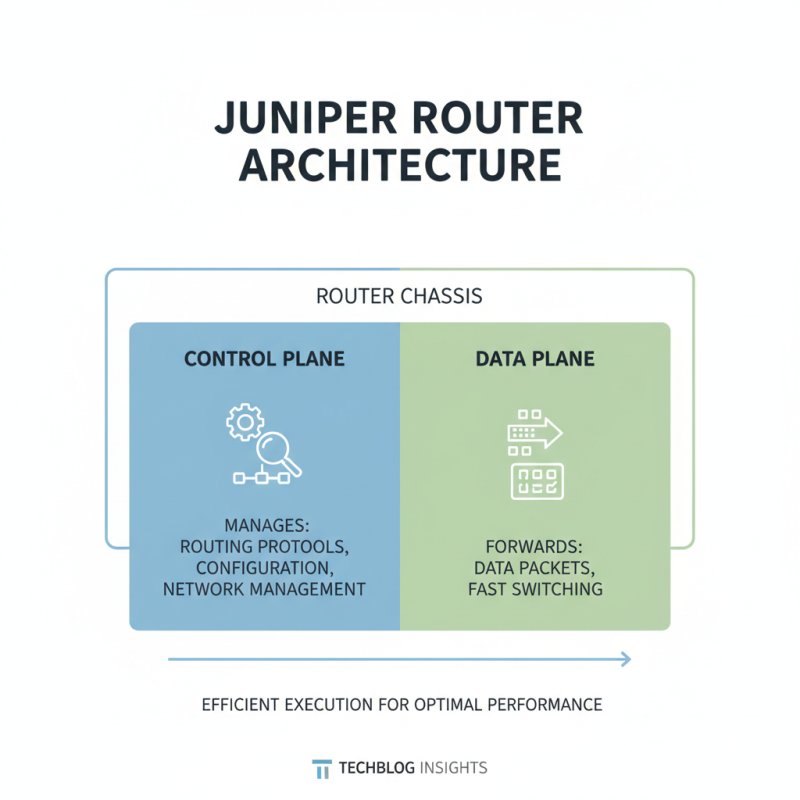
Understanding the architecture of Juniper routers is essential for optimal performance. These routers consist of several critical components. The control plane manages routing protocols and configurations. In contrast, the data plane forwards packets. A well-balanced router must efficiently execute these tasks.
Components like the Routing Engine and Forwarding Information Base play crucial roles. The Routing Engine handles system processes and protocol decisions. It’s vital to ensure it has enough resources. Insufficient memory can lead to sluggish performance. The Forwarding Information Base accelerates packet forwarding. An effective FIB requires regular updates to maintain speed.
Despite their strengths, configurations can lead to issues. Misalignment between the control and data planes may cause bottlenecks. Monitoring tools can help detect these problems early. Regular assessments are necessary. Fine-tuning these components improves overall functionality. Optimal performance is a continuous journey, not a destination.
Identifying Performance Metrics for Optimal Router Configuration
To configure routers for optimal performance, identifying the right performance metrics is crucial. Monitoring key performance indicators helps ensure your network runs efficiently. Focus on metrics like bandwidth utilization, latency, and packet loss. Bandwidth utilization indicates how much of your available capacity is being used. High utilization can lead to congestion, while low utilization may signal underused resources.
Tips: Regularly check bandwidth patterns. Schedule assessments during peak usage times. This helps reveal hidden issues.
Latency measures the time it takes for data to travel from source to destination. High latency can affect application performance. Understanding acceptable latency levels is vital for different applications. Use ping tests to measure response times regularly.
Tips: Consider using QoS settings to prioritize critical applications. This can reduce the impact of delays.
Packet loss happens when data packets fail to reach their destination. This can lead to degraded performance and user dissatisfaction. Tracking packet loss can highlight network inefficiencies. Regularly monitor this metric to identify problematic areas.
Sometimes, despite the metrics indicating good health, real user experiences may vary. Always seek feedback from users. Their insights can guide improvements that metrics alone may overlook.
How to Configure Juniper Routers for Optimal Performance?
| Metric |
Optimal Range |
Current Value |
Recommended Action |
| CPU Utilization |
< 75% |
80% |
Optimize routing processes |
| Memory Usage |
< 70% |
65% |
Monitor for spikes |
| Packet Loss |
0% - 1% |
2% |
Investigate network issues |
| Latency |
< 50ms |
70ms |
Check routing paths |
| Throughput |
> 1 Gbps |
950 Mbps |
Upgrade bandwidth |
Step-by-Step Guide to Configuring Routing Protocols
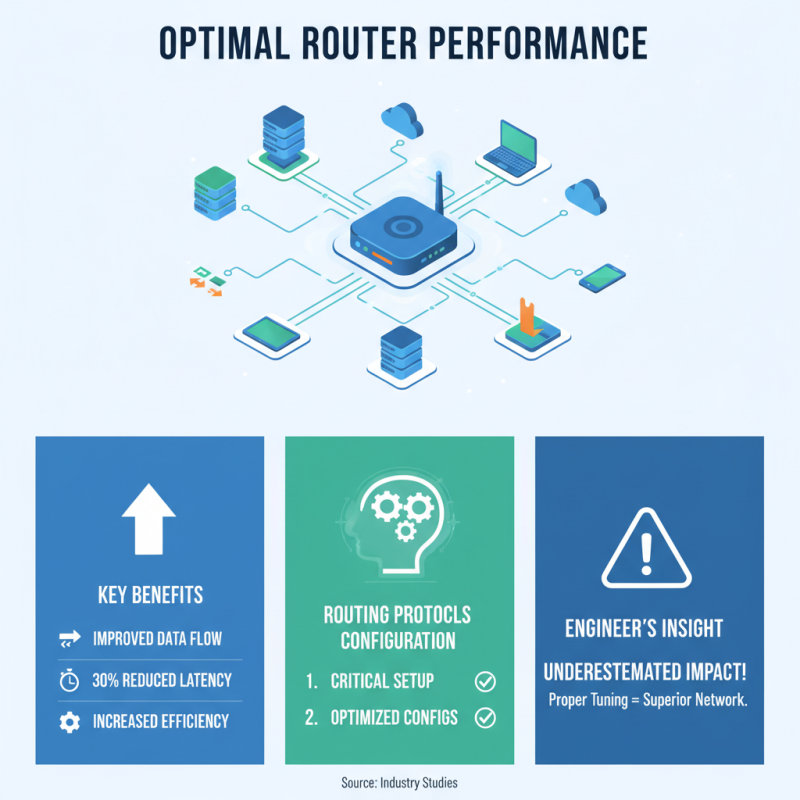
Configuring routing protocols is critical for optimal router performance. Proper routing setup can significantly improve data flow and efficiency. According to industry studies, well-tuned routing protocols can enhance network latency by up to 30%. Many network engineers underestimate the impact of optimized configurations.
Start by selecting the right routing protocol. Options like OSPF and EIGRP can work well for different environments. Ensure route summarization is used to reduce overhead. This reduces the size of routing tables, which improves lookup times. The average router can support thousands of routes, but efficiency suffers as the table grows.
**Tips**: Regularly review routing metrics. A common mistake is neglecting to adjust settings based on data. Monitor traffic patterns closely for adjustments.
Next, enable features such as Load Balancing. Distributing traffic over multiple paths can double throughput. Yet, without proper analysis, this may lead to under-utilized links. A balanced approach to bandwidth usage improves overall performance.
**Tips**: Implement backup routes as a safety net. It adds resilience. A failure in a primary route should not cripple the network.
Performance optimization is not a one-time task. Ongoing monitoring and adjustments are essential. Your configurations should evolve with the network's needs. Regular inspections can reveal hidden issues.
Implementing Quality of Service (QoS) for Enhanced Performance
Implementing Quality of Service (QoS) is crucial for enhancing router performance. QoS allows specific data types to receive priority in data transmission. This is especially important in networks handling voice, video, and critical data. Limited bandwidth can lead to congestion. By properly configuring QoS, you can ensure that essential services run smoothly, even during peak times.
Start by identifying applications that require prioritization. Voice calls and video conferencing need low latency and high reliability. Use traffic classification methods to categorize data. Assign different levels of priority to each category. For example, give voice traffic the highest priority, while general web browsing can take a lower priority. This can be complex, and not all applications fit neatly into categories.
Monitoring performance after implementing QoS is essential. Check how traffic flows and whether any issues develop. You may find that some applications still lag. This feedback will help refine your QoS settings. It's a continuous process. Adjustments may be needed as network demands change. Effective QoS configuration is not a one-time setup; it requires ongoing assessment and tweaking.
Regular Maintenance and Monitoring Practices for Efficiency
Regular maintenance is essential for routers to function efficiently. Ensure that firmware is updated routinely. This can prevent security vulnerabilities. Schedule updates during low-traffic periods. It minimizes disruption and allows for better performance.
Monitor the performance metrics frequently. Look for anomalies in bandwidth usage or latency. These can indicate underlying issues that need addressing. Regular checks can help identify potential bottlenecks early. If something feels off, dive deeper.
Tips:
- Run diagnostics monthly to catch minor issues early.
- Utilize logs to track any unusual patterns.
- Document changes or issues for future reference. This can save time down the road.
Being proactive is key. If your
network feels sluggish, reflect on recent changes. It might reveal unseen problems that need fixing. Being attentive can lead to smoother operations.